
Updated October 28, 2026 | Practical Guides
Have you ever asked an AI assistant a question and received an answer that sounded polished but wasn’t particularly useful?
The problem isn’t always the AI model. Sometimes the request simply leaves too much open to interpretation.
A prompt is the instruction or question you give an AI system. Learning how to write better AI prompts can help you get clearer, more relevant results from tools such as ChatGPT and Claude.
You don’t need complicated terminology or secret phrases. Effective prompting usually comes down to explaining what you want, providing useful context, setting reasonable constraints, and checking the result.
This beginner’s guide shows you how to do that, with practical examples and reusable prompts you can copy today.
What Makes a Good AI Prompt?
A useful AI prompt answers four basic questions:
- What is the task?
- What background information matters?
- What should the response look like?
- What limitations or rules should the AI follow?
Here’s a simple example.
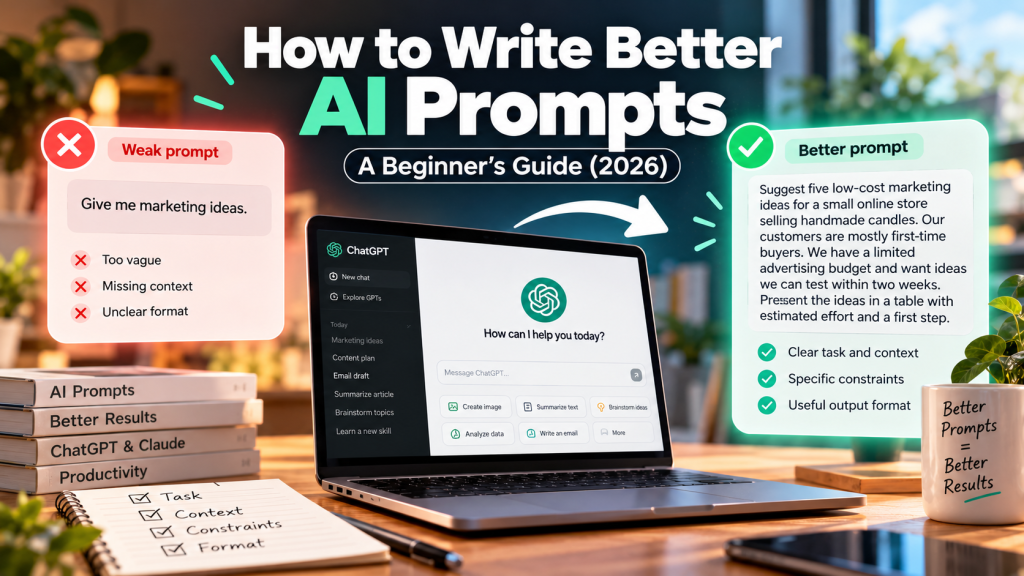
Weak prompt:
Give me marketing ideas.
Better prompt:
Suggest five low-cost marketing ideas for a small online store selling handmade candles. Our customers are mostly first-time buyers. We have a limited advertising budget and want ideas we can test within two weeks. Present the ideas in a table with estimated effort and a first step.
The second version gives the assistant a business, an audience, a constraint, a timeframe, and a useful output format.
It doesn’t guarantee a perfect answer, but it gives the model a much better starting point.
The Simple AI Prompt Formula
For most everyday tasks, try this structure:
Task + Context + Constraints + Output Format
You can copy this template:
I want you to help me [task].
Context: [relevant background].
Audience: [who the result is for].
Requirements: [important details to include].
Avoid: [things you don’t want].
Format: [paragraphs, bullet points, table, checklist, or another structure].
If important information is missing, ask before making assumptions.
Not every prompt needs every field. A simple question can be answered simply.
Use more detail when the task is complicated or the output matters.
1. Be Specific About the Outcome
“Help me write” is vague.
“Write a 150-word introduction for a beginner’s guide to home budgeting” is much clearer.
The difference is the intended result.
Try this prompt:
Write a 150-word introduction for an article about starting a monthly budget. The audience is young adults managing their finances for the first time. Use a friendly, practical tone and avoid financial jargon.
Specificity helps the AI understand what a successful answer should look like.
2. Explain Who the Answer Is For
The same topic may need very different explanations for different audiences.
A software developer might want technical details. A beginner might need an analogy and a short example.
Try this prompt:
Explain cloud computing to someone who has never worked in IT. Use one everyday analogy, explain three common uses, and avoid unnecessary technical terms.
Audience context often matters more than asking the AI to sound “professional.”
3. Give Relevant Background Information
An assistant can’t know details you haven’t shared.
If you want help planning a trip, your budget and travel style matter. If you’re writing a customer email, the relationship and reason for contacting the customer matter.
Try this prompt:
Help me plan a weekly content schedule for a small AI tools blog. We publish two articles per week, have one writer, and want a mix of practical guides and product comparisons. Suggest a realistic four-week plan without assuming we can publish daily.
Include only the context needed for the task. Avoid sharing sensitive personal or business information unnecessarily.
4. Set Clear Constraints
Constraints help prevent answers that are too long, too expensive, too technical, or otherwise unsuitable.
Useful constraints include word count, reading level, budget, deadline, available resources, and information that must not be invented.
Try this prompt:
Suggest three ways to improve a home-office setup for under $100. Prioritize comfort and organization. Don’t recommend buying a new desk or computer. Explain the trade-offs of each option.
A good constraint narrows the problem without telling the assistant exactly what conclusion to reach.
5. Ask for a Useful Format
Sometimes an AI answer contains the right information but presents it poorly.
You can request a table, checklist, numbered instructions, or short summary.
Try this prompt:
Compare these three options in a table with columns for Cost, Main Benefit, Main Drawback, and Best Use Case. After the table, recommend which option fits the requirements I’ve provided.
Choose the format that makes the information easiest to use.
A table is helpful for comparisons. A checklist is often better for a process.
6. Provide an Example of What You Like
If you’re struggling to describe a writing style, an example can help.
Try this prompt:
Rewrite my paragraph to match the tone of the sample below. Keep the original meaning and facts, but use similarly short sentences and straightforward language.
Sample: [your example]
Paragraph: [your paragraph]
This is particularly useful for emails, product descriptions, social posts, and brand writing.
Use material you have permission to share.
7. Break Complex Tasks Into Steps
One enormous prompt isn’t always the most efficient approach.
For a complicated project, ask the assistant to work through stages.
Step 1:
Help me identify the five most important questions I should answer before writing a business plan for this idea: [idea].
Step 2:
Based on my answers, create a business-plan outline. Flag assumptions that need research.
Step 3:
Draft the first section using only the information we’ve established.
This approach gives you more opportunities to catch mistakes before they spread through the final result.
8. Tell the AI How to Handle Uncertainty
AI assistants sometimes fill gaps with plausible-sounding information.
You can reduce that risk by explicitly asking them to distinguish known facts from assumptions.
Try this prompt:
Answer using the information I provide. If a fact is missing, say “Not provided.” Don’t invent statistics, quotes, customer feedback, or sources. Clearly label any recommendation that is based on an assumption.
This is especially useful for research summaries, business reports, and content intended for publication.
It doesn’t eliminate errors, so independent verification still matters.
9. Improve the Answer With Follow-Up Prompts
You rarely need to start over when the first response isn’t right.
A few focused follow-ups can make a big difference.
Useful follow-up prompts:
Make this more concise without removing important information.
Give me a concrete example for each recommendation.
Which parts of your answer rely on assumptions?
Rewrite this for a beginner while keeping the technical details accurate.
Challenge your recommendation. What are the strongest reasons it might be wrong?
Treat prompting as a conversation rather than a one-time command.
10. Ask for Alternatives, Not Just One Answer
When you’re making a creative or strategic decision, the first idea isn’t necessarily the best one.
Try this prompt:
Give me three distinct approaches to this problem: one low-cost option, one fast option, and one long-term option. Explain the main trade-offs and what information would help me choose.
This encourages a more useful comparison instead of a single confident recommendation.
Five Ready-to-Use AI Prompts
Here are five templates you can adapt to everyday tasks.
Writing Assistant
Improve the clarity and flow of the text below. Keep my original meaning and tone. Remove repetition, but don’t add facts or change my opinion.
Text: [paste text]
Learning Assistant
Teach me [topic] as a beginner. Start with a simple explanation, then give a real-world example. Ask me one question to check my understanding before continuing.
Research Assistant
Help me investigate [question]. Separate verified facts, reasonable interpretations, and unanswered questions. Provide sources when available, and tell me what I should verify independently.
Planning Assistant
Help me create a realistic plan for [goal]. My deadline is [date], my available time is [hours], and my constraints are [constraints]. Break the work into manageable steps and flag anything that may not fit.
Decision Assistant
Compare [option A] and [option B] for someone who values [priorities]. Explain the advantages, drawbacks, hidden costs, and situations where each option makes more sense. Don’t force a winner if the evidence is insufficient.
Common AI Prompting Mistakes
Mistake 1: Using Vague Instructions
“Make it better” doesn’t tell the assistant what should improve.
Try “make the introduction shorter and explain the main benefit in the first two sentences.”
Mistake 2: Adding Unnecessary Detail
More words don’t automatically produce better answers.
Include information that affects the task. Leave out unrelated background.
Mistake 3: Asking for Certainty Where None Exists
Don’t ask an AI to guarantee future results, predict an investment’s return with certainty, or invent evidence for a claim.
Ask it to explain uncertainty and identify what would need to be verified.
Mistake 4: Trusting Every Citation
A citation can be incorrect, outdated, or unrelated to the claim it supposedly supports.
Open the source and check it.
Mistake 5: Forgetting to Review the Output
Even a well-written prompt can produce errors.
Read the final result, check important facts, and make sure it reflects your actual goals.
Do You Need Different Prompts for ChatGPT and Claude?
Usually, the fundamentals are the same.
Both ChatGPT and Claude benefit from clear tasks, relevant context, examples, and useful constraints.
Different models may respond differently to the same instructions, so it can help to experiment with wording or break a task into smaller parts.
But there’s no need to learn an entirely separate prompting language for each assistant.
Related comparison: ChatGPT vs Claude (2026): Which AI Assistant Is Better?
This comparison explores the differences between the two assistants in writing, coding, research, and everyday productivity.
A Better Way to Practice Prompting
Pick a task you already understand well, such as rewriting an email or organizing a shopping list.
First, give the AI a vague prompt.
Then try again with a specific goal, relevant context, two or three constraints, and a clear output format.
Compare the results.
Notice which details actually improved the answer. Over time, you’ll develop a few reusable prompt structures that fit your work.
Final Thoughts
Better AI prompting isn’t about finding magic words.
It’s about communicating clearly.
Start by explaining the task, providing the context that matters, and describing the result you want. Ask the assistant to flag uncertainty, and review its output before using it.
The most effective prompt is not necessarily the longest one. It’s the one that helps you get a useful, accurate answer with the least unnecessary effort.
Frequently Asked Questions
What is an AI prompt?
An AI prompt is the instruction, question, or input you give an AI system to guide its response.
How do beginners write better ChatGPT prompts?
Start with a specific task, explain the audience and context, add important constraints, and request a useful format. Refine the answer with follow-up questions.
Do longer prompts always work better?
No. Relevant detail helps, but unnecessary information can make the request harder to follow.
Can the same prompt work in ChatGPT and Claude?
Yes. Most everyday prompts work across both tools, although the responses may differ.
Can a good prompt stop AI hallucinations?
No prompt can guarantee factual accuracy. Asking the AI to acknowledge uncertainty helps, but important information still needs verification.
Is prompt engineering worth learning?
Yes, in the practical sense of learning to give clear instructions and evaluate results. Most beginners don’t need advanced techniques to see improvements.
Editorial note: The examples in this guide are illustrative prompts. Their usefulness depends on the task, model, and information supplied.